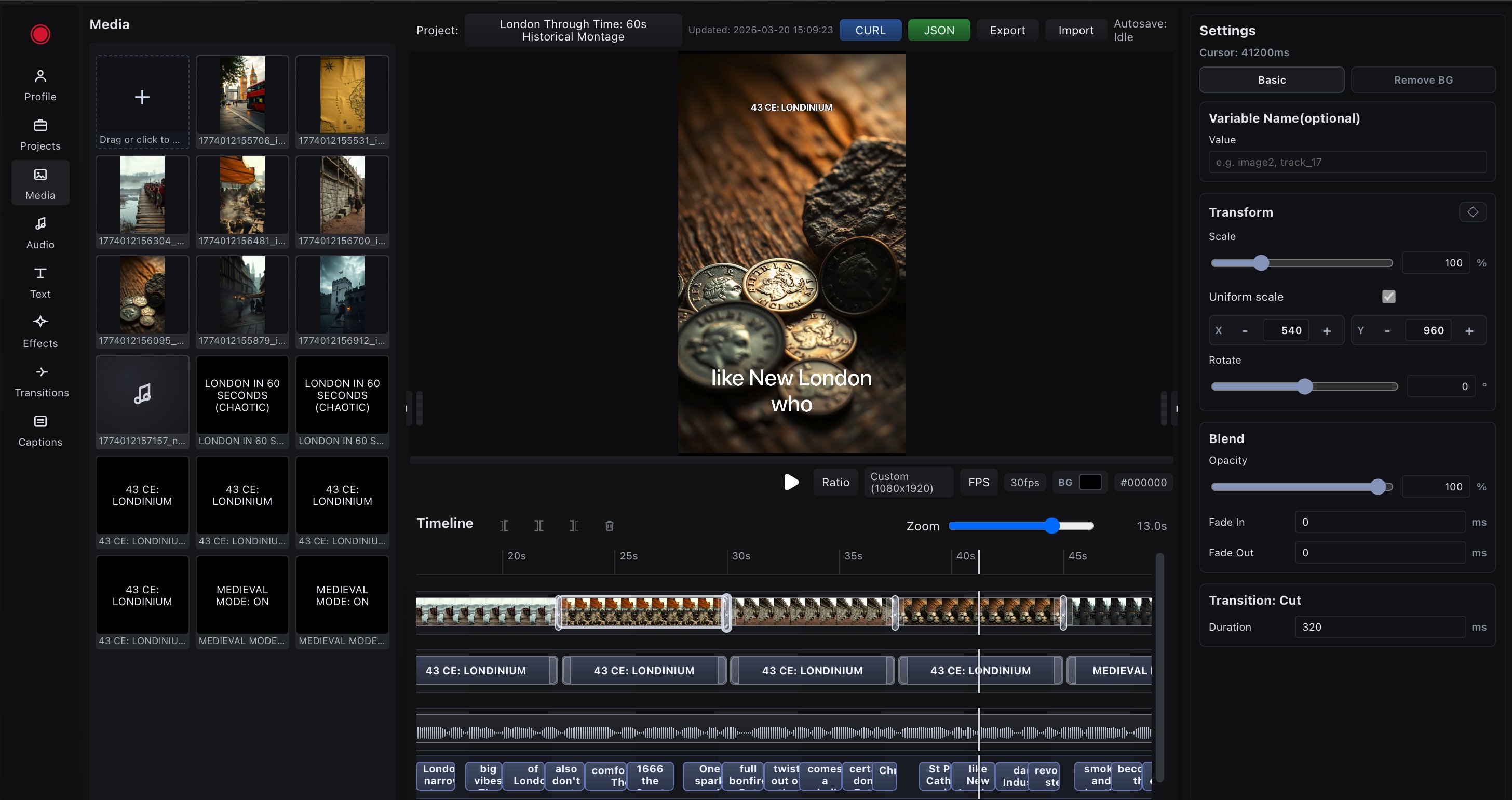
Design scenes visually, tune timing in timeline, and export clean JSON for your app. Build fast with no desktop install and no hidden editor fees. Claude and Codex ready for prompt-driven JSON generation workflows.
Multi-track timeline with precise scene, text, and audio timing
Built-in panels for media, music, sounds, effects, transitions, and captions
Live preview with transform controls, fades, blend, and motion settings
One-click JSON and cURL export to move from visual edit to API automation
Ready for n8n, Make.com, and Zapier automation scenarios
Enter your API key and prompt. JSONClip runs an OpenAI-driven pipeline with explicit steps and full input/output data per stage. Current mode generates and stores image assets first, then prepares render schema. Default output is 1280x720. If you want portrait or another size, mention it directly in the prompt. Maximum output size is 4K.
Automation Guide
How to run JSONClip from n8n, Make.com, and Zapier
Use your workflow tool to build render JSON, then call POST https://api.jsonclip.com/render?sync=1 with your API key. This is the fastest way to generate videos from forms, CRM updates, feeds, and scheduled jobs.
n8n setup
Trigger from Webhook, Cron, Google Sheets, Airtable, or Notion.
Use Set/Function node to build the JSONClip render_config payload.
Send HTTP Request node:POST https://api.jsonclip.com/render?sync=1 with header X-Api-Key.
Read movie_url and pass it to Telegram, Slack, Email, or your database.
Make.com setup
Start scenario with Watch modules (Sheets, Forms, CRM, Webhooks, APIs).
Create JSON with Variables/Compose modules for scenes, text, audio, and timing.
Call JSONClip with HTTP module:POST https://api.jsonclip.com/render?sync=1 and X-Api-Key.
Store movie_url in Airtable/Notion or deliver it to socials and client tools.
Zapier
Zapier setup
Trigger from Sheets, Airtable, HubSpot, forms, schedules, or Webhooks by Zapier.
Use Formatter or Code by Zapier to assemble the JSONClip render_config payload.
Send Webhooks by Zapier request:POST https://api.jsonclip.com/render?sync=1 with header X-Api-Key.
Forward movie_url to Gmail, Slack, CRM records, storage, or the next automation step.